
What to Look For in a CTR Manipulation Tool for Clicker Networks
A clicker network lives or dies on whether its visits survive scrutiny. Buyers want screenshot proof, clean visit paths, and credits that are not burned on searches that never reach the landing page. Choosing the wrong tool means paying for traffic that looks real until a client asks for evidence.
This article lays out the criteria that separate a usable CTR tool from a risky one, then maps each criterion against CTRTool's campaign setup, proof and credit model. By the end you will know which features to demand and whether CTRTool fits your network.
What Is CTRTool? Who It Serves and What It Runs
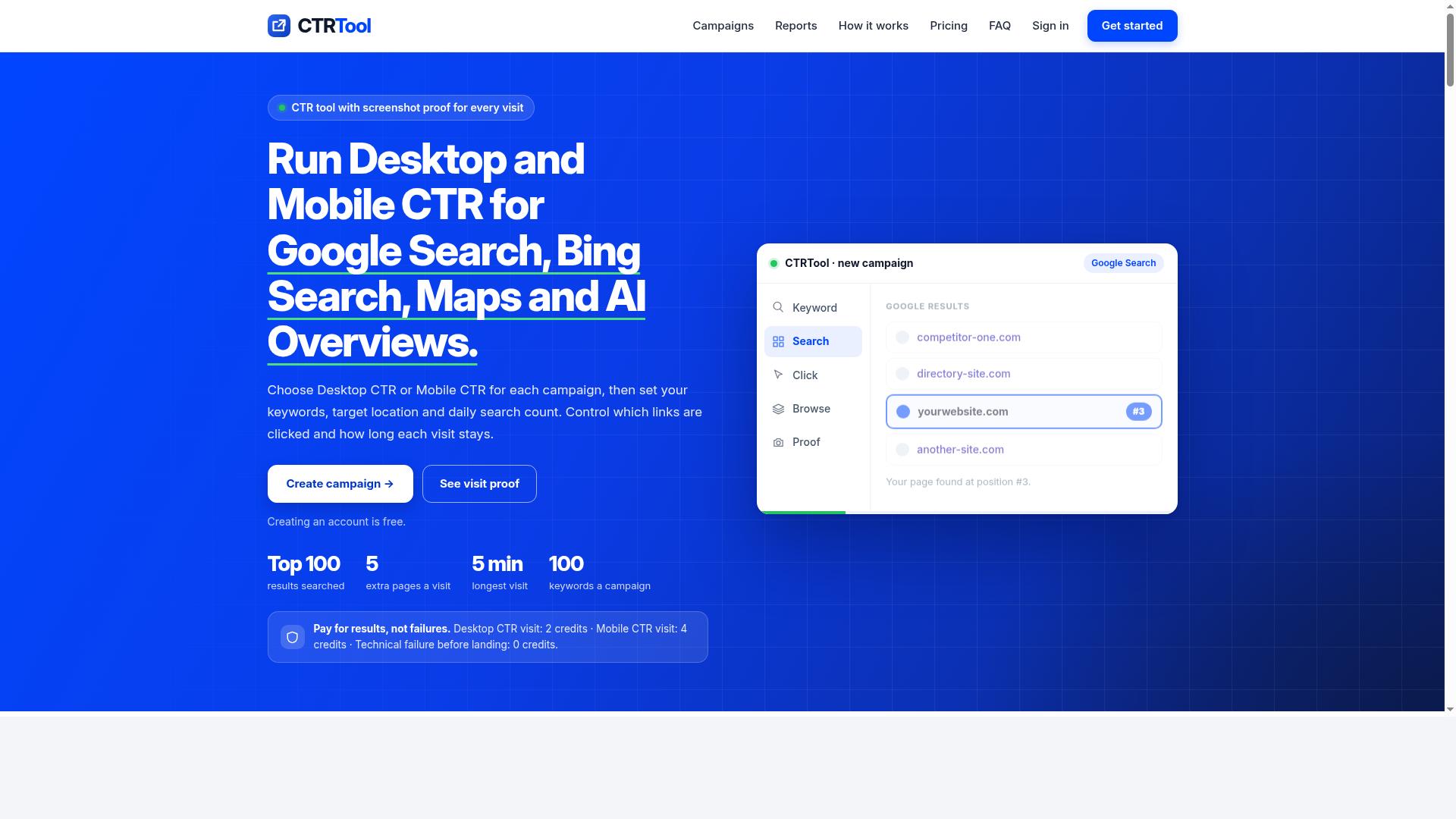
CTRTool is a SaaS platform that runs desktop and mobile CTR campaigns for Google Search, Bing Search, Google Maps, and AI Overviews, providing screenshot proof for every visit. It is built for SEO practitioners and agencies who want to influence click-through rate and SERP behavior on pages they control.
That audience matters. CTRTool is designed for people running campaigns for their own websites or client properties, not for random bystanders. Agencies managing multiple accounts get a single dashboard for campaign management, while in-house SEO teams can test how click-through rate shifts affect organic ranking signals.
The platform supports four distinct campaign types, each mapped to a different surface:
- Google Search CTR for standard organic results
- Bing Search CTR for Microsoft's search engine
- Google Maps CTR for local and map-pack visibility
- AI Overviews for the AI-generated answer blocks now common on result pages
Per campaign, users choose Desktop CTR or Mobile CTR, then set keywords, target location, and daily search count. They also control which links are clicked and how long each visit stays, which covers dwell time and click distribution in practical terms. That level of control separates a real CTR manipulation tool from generic traffic simulation.
CTRTool is upfront about limits. The site states plainly: "Automated visits do not guarantee rankings." That honesty is worth noting for anyone comparing clicker networks. A tool that promises guaranteed positions is overselling. One that gives you keyword targeting, geo-targeting, and per-visit screenshot proof, while telling you rankings are not assured, is giving you something you can actually verify and reason about.
For SEO practitioners, the value sits in the combination: selectable device type, defined keywords and locations, a daily search volume you set, and evidence for every visit. Those are the levers that matter when you are testing whether SERP behavior responds to changes in click-through rate.
The Direct Answer: What to Look For in a CTR Tool - and How CTRTool Meets Each Criterion
When evaluating a CTR tool, focus on three non-negotiable criteria: verifiable proof of each visit, complete visit paths with position tracking, and a pricing model that charges only for successful results.
Each criterion solves a specific risk. Proof prevents fraud, because a screenshot of the search result and the landing page confirms the click actually happened as specified. Visit paths and position tracking confirm authentic behavior rather than a hollow hit counter, and pay-for-results pricing aligns your costs with real outcomes instead of failed attempts.
CTRTool is built around all three. The sections below break down how its screenshot proof, longitudinal tracking, and credit system satisfy each requirement for anyone running clicker networks or managing CTR manipulation campaigns.
Verifiable Proof for Every Visit
CTRTool provides screenshot proof for every visit, with separate images for the search result and the landing page, so you can confirm that each click actually occurred as specified.
This matters because a CTR manipulation tool is only as trustworthy as the evidence it produces. Without proof, you cannot tell a genuine visit from a logged task that never reached the target page. Two separate images close that gap: one shows the keyword in the search results with the click on the organic result, the other shows the landing page the visit reached.
The proof is not limited to standard organic searches. According to the brand's stated features, screenshot proof is available for all campaign types, including Maps and AI Overviews. That breadth is unusual in a market where many tools only document plain web searches.
For operators running clicker networks across multiple sites and keywords, this proof doubles as an audit trail. You can review evidence per visit rather than trusting aggregate counts, which makes it easier to catch misconfigured campaigns, verify keyword targeting, and show clients or stakeholders exactly what was delivered.
Full Visit Paths and Position Tracking Over Time
Beyond a single click, CTRTool records the full visit path and tracks keyword positions over time, including Maps listing order and AI citation order, giving you a longitudinal view of ranking changes.
A visit path shows the sequence of pages a session touched, not just the entry page. CTRTool supports visits of up to 5 minutes with up to 5 additional internal pages, which produces a more realistic session than a single-page hit. That depth supports healthier dwell time and a more natural bounce rate signal.
Position tracking adds the other half of the picture. The tool monitors where the keyword ranks in standard search results, where the Maps listing appears, and where an AI citation lands, so you can correlate CTR campaigns with ranking movements instead of guessing. Because the data is tracked over time, you see trends rather than a single snapshot.
For anyone studying SERP behavior, this pairing is genuinely useful. Click data without rank data tells you what you sent; rank data without click data tells you what changed. Together they let you judge whether a campaign coincided with a shift in organic ranking and adjust keyword targeting or click distribution accordingly.
Pay-for-Results Credits With No Charge for Pre-Landing Failures
CTRTool uses a credit-based system where you are only charged when a visit is successfully completed, meaning pre-landing failures such as the page not appearing in the top 100 results or a Maps listing not being found do not consume credits.
The eligibility rules are clear. For a standard campaign, the page must appear in the top 100 organic results for the chosen keyword and location. Maps campaigns check up to 50 listings, and AI Overview campaigns require a matching citation. If those conditions are not met, no credits are deducted.
Credit costs are straightforward:
- Desktop CTR visit: 2 credits
- Mobile CTR visit: 4 credits
- Verified search without a match: 1 credit
- Technical failure before landing: 0 credits
Monthly plans start at $59 for 2,000 credits and scale to $699 for 40,000 credits, with one credit balance shared across all campaign types, websites, and keywords. Unused credits roll over while your subscription stays active.
This structure aligns cost with outcome, which is the fairest model for traffic simulation at scale. A failed attempt costs you nothing, so budget goes only toward visits you can verify.
Key Features and What Makes CTRTool Stand Out
CTRTool distinguishes itself through broad campaign coverage across four search surfaces and granular controls over device type, keywords, location, and daily search volume. Those two feature areas work together: coverage decides where a campaign runs, and the control settings decide how precisely it behaves.
For anyone comparing a CTR manipulation tool for clicker networks, this combination matters. Wide coverage supports a unified strategy, while tight controls make campaigns scalable without losing accuracy.
Campaign Coverage: Google Search, Bing Search, Maps and AI Overviews
CTRTool runs campaigns on Google Search, Bing Search, Google Maps, and AI Overviews, covering the major surfaces where organic visibility drives traffic. Each campaign type follows the same core logic: simulate a real search, find the target, and click through.
On Google Search CTR, the tool searches a keyword and clicks the organic result. Campaigns can reach the top 100 results, and visits can extend to internal pages beyond the landing page. Bing Search CTR applies the same approach to Bing, so a strategy is not limited to one engine.
Google Maps CTR works differently. The campaign finds a business listing and clicks its website link, with city targeting and up to 50 listings checked. AI Overview CTR requires a matching citation: the tool finds your website in the overview and clicks its source link, following citation order.
This coverage lets you run one coherent plan across search engines and local results instead of treating each surface as a separate project. For agencies managing several clients, that consistency simplifies campaign management and keeps reporting comparable across surfaces.
Desktop vs. Mobile Control, Keyword, Location and Daily Search Settings
For each campaign, you can choose Desktop CTR or Mobile CTR, specify target keywords, set the country and optionally state and city, and define daily search volumes to control pacing. These settings are what separate a precise campaign from a blunt one.
Device choice matters because real users split between desktop and mobile, and device-specific campaigns let you mimic that behavior rather than sending every visit from one profile. On the delivery side, CTRTool uses Desktop Chrome windows and real Android phone sessions matched to the target location through managed proxy routes, which supports IP diversity and more natural SERP behavior.
Keyword targeting allows up to 100 keywords per campaign, with search depth up to 100. Location options include country, state, and city, or Any country for a mixed footprint. That flexibility supports geo-targeting without rebuilding a campaign for every market.
Daily search counts can run now, spread out, or with a gap, with days, hours, and time zone settings, and daily goals reset at 00:00 UTC. Controlling click velocity this way helps campaigns avoid unnatural spikes. Additional controls cover target URL, internal page URLs, link text, click order, scrolling time, up to five additional pages per visit, and visits up to five minutes total.
Pricing and Plans
CTRTool offers monthly plans in USD: Starter at $59 per month for 2,000 credits (up to 1,000 Desktop CTR visits or 500 Mobile CTR visits) and Growth at $125 per month for 5,000 credits (up to 2,500 Desktop or 1,250 Mobile visits). Growth is marked Recommended, which makes it the natural middle ground for campaigns that run steadily rather than in bursts.
Two larger tiers cover heavier workloads. Scale costs $399 per month for 20,000 credits (up to 10,000 Desktop or 5,000 Mobile visits), while Agency costs $699 per month for 40,000 credits (up to 20,000 Desktop or 10,000 visits on mobile).
| Plan | Monthly Price | Credits | Desktop Visits | Mobile Visits |
|---|---|---|---|---|
| Starter | $59 | 2,000 | 1,000 | 500 |
| Growth (Recommended) | $125 | 5,000 | 2,500 | 1,250 |
| Scale | $399 | 20,000 | 10,000 | 5,000 |
| Agency | $699 | 40,000 | 20,000 | 10,000 |
The credit system is where the pricing becomes genuinely predictable. A Desktop CTR visit costs 2 credits and a Mobile CTR visit costs 4, so you can map any plan to a visit count before you commit. A verified search that produces no match costs 1 credit, and a technical failure before landing costs 0 credits.
That last point matters for anyone running campaigns through clicker networks. Credits are only consumed for successful visits, and pre-landing failures are not charged. The effective cost per visit stays stable instead of drifting upward when sessions fail.
Unused credits roll over while your subscription is active, which suits campaigns that pause between keyword pushes. They expire when cancellation takes effect, so plan around the billing cycle. Creating an account is free, and custom development carries a separate one-time fee agreed in advance.
One timing note deserves attention. The site displays limited launch pricing with the message "Prices rise 30% on November 15", and the page also shows November 15, 2026. If you are comparing tiers, locking in current rates is the sensible move.
Trust Signals: Eligibility Rules, Transparency and Support
CTRTool builds trust through clear eligibility rules, transparent proof for every visit, and accessible support via email. For anyone evaluating a CTR manipulation tool for clicker networks, these three areas matter more than most feature lists. They decide whether credits go toward work that can actually run, whether you can verify what happened, and whether help is available when a campaign stalls.
Eligibility checks are the first line of defense against wasted spend. A campaign that targets a keyword where your page cannot be found is simply burning balance. CTRTool screens each campaign before it runs so the click-through rate work is aimed at a plausible target.
- Top 100 organic results: the page must appear within the top 100 organic results for the chosen keyword and location.
- Maps listing checks: Maps campaigns check up to 50 listings, roughly five pages of results.
- AI Overview campaigns: a matching source link is required before the campaign is accepted.
These rules map directly to how real SERP behavior works. If a searcher would never encounter your page for a query, simulated clicks on that query look unnatural and offer little value. By enforcing placement first, CTRTool keeps keyword targeting honest and protects the user's balance from campaigns that cannot produce meaningful search query simulation.
Transparency is the second pillar. CTRTool provides screenshot proof for visits along with full visit paths, so you can see how a session unfolded rather than trusting a bare counter. For teams running traffic simulation at scale, that evidence is what separates a verifiable campaign from a black box.
Proof matters because clicker networks involve many moving parts: proxy rotation, residential proxies, IP diversity, session management, and cookie handling all influence whether a visit looks genuine. Screenshot proof and visit paths give campaign managers something concrete to review, and they support reporting when you need to explain results to a client or stakeholder.
CTRTool also keeps its limits visible. The platform explicitly does not guarantee higher rankings, leads or sales. That honesty is a trust signal in itself: a tool that promises guaranteed organic ranking gains is making a claim no one can back up, since search engines control their own algorithms.
Operational details are equally clear. Daily goals reset at 00:00 UTC, and one balance covers all campaigns, with support for up to 100 campaigns and 100 keywords per campaign. Knowing these boundaries up front helps with task scheduling and campaign management, and it prevents surprises when you scale concurrency or adjust throttling across many keywords.
Support and legal transparency round out the picture. Questions can be sent to vaibhav@autoblogging.ai, giving users a direct email channel for account or campaign issues. CTRTool also publishes legal notices, including the country, state and city records provided by CountryStateCity via the @countrystatecity/countries 2.0.0 package under the Open Database License 1.0 and Database Contents License 1.0.
That level of disclosure is uncommon in this niche. Documented data sources and published terms let you check how geo-targeting data is sourced rather than taking it on faith. Combined with eligibility rules that guard your credits and screenshot proof that documents each visit, CTRTool presents a credible, well-documented option for clicker network campaigns.
Who Should Use CTRTool
CTRTool is designed for SEO practitioners and agencies who need to run CTR campaigns for their own or client websites across Google Search, Bing Search, Google Maps, and AI Overviews. It is a campaign tool built around the workflow of people who manage organic visibility day to day, not a general-purpose marketing suite.
The platform fits teams that already understand search engine optimization and want a dedicated environment for click-through rate work. If your job involves watching rankings, testing how snippets perform, or reporting on visibility for multiple properties, you are in the intended audience.
Three broad groups get the most from it:
- SEO professionals who want to influence CTR on target keywords and observe how those changes affect organic ranking over time.
- Agencies running campaigns on behalf of client websites, where campaign management across several properties needs to stay organized.
- Consultants who test SERP behavior and need a repeatable way to run and compare experiments.
Each group shares one trait: they treat CTR as a measurable input rather than a guess. That mindset is what separates a serious CTR manipulation tool user from someone experimenting casually.
Beyond standard search campaigns, the site's guidance mentions tier links, PBNs, and test properties. That makes CTRTool relevant to practitioners who already work with tiered link structures and want their CTR activity to fit alongside those setups.
Local visibility is another clear use case. Because the tool covers Google Maps, it suits agencies handling local presence for clients, where map pack visibility can matter as much as classic organic listings. Teams can run Maps campaigns in the same place they manage search campaigns.
Testing is the third use case. Practitioners can use test properties to study SERP behavior before committing effort to a live client site. That supports a more careful, evidence-led approach to keyword targeting and snippet strategy.
If you are a solo site owner with one small property, the tool may be more than you need. It is built for people running CTR campaigns at some volume, across multiple keywords, domains, or clients. The value comes from repeatable campaign work, not one-off clicks.
In short, CTRTool serves SEO practitioners and agencies who run CTR campaigns for their own or client websites across Google Search, Bing Search, Google Maps, and AI Overviews, and who work with tier links, PBNs, and test properties as part of that practice. If that describes your workflow, you are exactly who the tool is built for.
Final Verdict
CTRTool delivers a verifiable, pay-for-results approach to CTR campaigns, with broad coverage and granular controls that make it a strong choice for SEO professionals seeking to influence organic rankings. For anyone comparing a CTR manipulation tool for clicker networks, the platform stands out because it is built around proof rather than promises.
The core strength is verification at every step. Each visit is backed by evidence, and campaigns follow full visit paths rather than isolated clicks. That distinction matters when you are trying to shape SERP behavior in a way that looks natural to search engines.
Position tracking adds another layer of accountability. You can see where your keyword targeting actually lands, which turns an otherwise opaque process into something you can measure and adjust. Combined with pay-for-results credits, the model keeps spend tied to delivered outcomes instead of vague commitments.
Multi-surface campaign coverage rounds out the package. Whether your search engine optimization efforts focus on one property or several, the tool supports campaign management across surfaces without forcing you into a single narrow workflow.
No tool is without limits. CTRTool works best when your pages already rank inside the top 100, so it complements solid on-page and technical work rather than replacing it. Readers should treat it as an accelerator for pages that are already visible, not a shortcut for content that has never ranked at all.
Weighing the evidence, the verdict is straightforward. CTRTool is a credible, results-oriented option for teams that want transparent proof of delivery and fine-grained control over click distribution, throttling, and scheduling. If those priorities match your campaign goals, it deserves a serious look.
To get started or ask questions, contact support at vaibhav@autoblogging.ai. Account access is available through the site's Sign in and Create an account pages, and additional details sit under Support, Terms of use, and Legal notices.
Frequently Asked Questions
What should I check first when choosing a CTR manipulation tool for clicker networks?
Start with verifiability: the tool should provide proof for every visit, not just aggregate numbers. CTRTool includes screenshot proof for each visit, with search and landing screenshots as separate proof images, plus full visit paths so you can confirm the click actually happened. This matters when you're running campaigns for clients or across a clicker network where accountability is essential.
Does the tool support both desktop and mobile campaigns, and multiple search engines?
A capable tool should let you choose device type per campaign rather than forcing one format. CTRTool lets you select Desktop CTR or Mobile CTR for each campaign and runs campaigns across Google Search, Bing Search, Maps and AI Overviews. That flexibility helps you match real user behavior for each keyword and client.
How do I know my target page is actually eligible to receive the clicks?
Eligibility rules vary by campaign type, so confirm them before you buy. With CTRTool, your page must appear within the top 100 organic results for the chosen keyword and location; Maps campaigns check up to 50 listings (about five pages), and AI Overview campaigns require a matching source link. Checking these requirements upfront avoids wasted credits.
Can I target specific locations and track keyword positions over time?
Location targeting and position tracking are both important for realistic campaigns. CTRTool lets you target a chosen country and optionally a state and city, or use "Any country" for a mix of supported locations, and it tracks keyword positions over time including Maps listing order and AI citation order. This gives you a clearer picture of whether campaigns are moving rankings, not just delivering clicks.
How does pricing work, and what do credits actually cover?
Look for pay-for-results credit pricing you can scale with your workload. CTRTool offers monthly plans in USD: Starter at $59/month for 2,000 credits (up to 1,000 Desktop CTR visits or 500 Mobile CTR visits) and Growth at $125/month for 5,000 credits (up to 2,500 Desktop or 1,250 Mobile visits). Desktop and Mobile visits consume credits at different rates, so plan around the device mix you need.
What support is available if I run into an issue setting up campaigns?
Reliable support matters when you're managing campaigns across multiple clients or properties. CTRTool lists a support email (vaibhav@autoblogging.ai) in its FAQ, and the site includes Support, Terms of use and Legal notices pages. Reach out there for setup questions before committing to a plan.